Live interviews punish hesitation. You can have the right idea, the right wording, and the right instinct, and still sound weaker than you are if the answer arrives a beat too late. We optimize for time to first answer token before almost everything else because that first beat decides whether the assistant feels like calm support or dead weight. In practice, the experience of using an interview assistant is shaped less by benchmark theater and more by whether the first useful sentence lands quickly enough to keep your own thinking rhythm intact when the room gets tense.
Mercury 2 stays at the top of our stack for that reason. In live sessions it most often feels ready to move at conversation speed, not demo speed, and that difference matters when every pause sounds louder than it should. Gemini Flash 3.1 Lite stays close behind because it is still quick, scales well, and gives us a very strong fallback when we want speed with a more familiar ecosystem behind it. The difference is not that Gemini is weak. The difference is that Mercury more often feels like the sharper tool when the cost of even a small delay is your own confidence.
The table below is the cleanest version of that opinion. It is not meant to pretend these models live in a sterile benchmark lab. It is meant to reflect what matters in a real interview loop: how quickly the first answer appears, whether the stream keeps up, and whether the price feels justified once real pressure enters the conversation.
| Model | Time to first token | Tokens / sec | Cost / price ratio |
|---|---|---|---|
| Mercury 2 | p95 sub-second latency under high concurrency. Our measurement on a technical question: avg 0.5 ~ 1.5s. | 1,009 tok/s. | $0.25 in / $0.75 out. |
| Gemini Flash 3.1 Lite | 2.5x faster than Gemini 2.5 Flash. Our measurement on a technical question: avg 1 ~ 2.5s. | +45% vs Gemini 2.5 Flash. | $0.25 in / $1.50 out. |
Because vendors publish different official speed metrics, this table uses the concrete numbers each company actually discloses instead of inventing a fake apples-to-apples benchmark. What matters to us is still the same question: which stack keeps the answer moving when the interview is live.
Once the model decision is clear, the audio stack becomes the next bottleneck. After going through the vendor docs, shipping the integrations, and then living with them in real sessions, the pattern has been pretty stable for us. Deepgram Flux is the best default for English interview flow because it is built around conversational turn-taking, fast end-of-turn decisions, and low-latency voice-agent behavior. The tradeoff is that it is English-only today, and that specialization is part of why it feels so dialed in when the interview is happening in English and the transcript needs to keep pace with the room.
ElevenLabs Scribe is the better choice once multilingual quality becomes the real requirement instead of an edge case. Its realtime stack is designed for live use, it publicly targets under 150 ms latency, and it covers 90+ languages, which makes it much easier to trust when the candidate or interviewer moves outside English. Apple Speech is still worth keeping around because the local path is attractive and the privacy story is clean, but we treat it as the fallback rather than the first pick. It is useful when you want to stay closer to the device, yet the dedicated cloud stacks still feel stronger in the moments where interview pressure exposes every weak transcription choice.
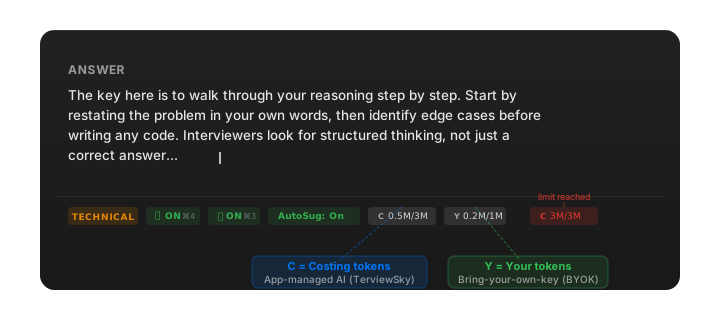
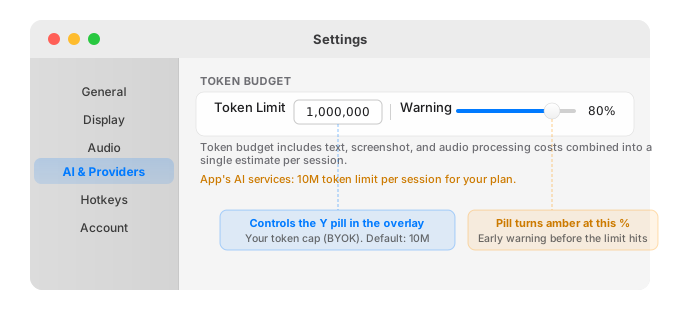
For people who do not want to manage keys, we run managed models on our side, but we try very hard to earn that convenience. The routing has been heavily tested, the prompt and timeout behavior have gone through repeated iteration, and we spend deep engineering work on the unglamorous details that make the product feel reliable instead of lucky. We care about answer quality, stability, and recovery behavior just as much as raw model speed, which is why we are comfortable offering higher rate limits while still keeping a generous per-session token budget in place. If that tradeoff matters to you, the privacy note and legal page are the right places to read the boundary clearly: requests go directly to your provider when you bring your own key, and managed setups carry their own privacy tradeoffs.
Get your free API key
Useful provider links
If you want to compare the stacks yourself, these are the four starting points we keep coming back to.